 QuickAttach
“Every order needs its own file.”
QuickAttach keeps each personalized report, title certificate, or custom proof tied to the customer and order item it belongs to.
QuickAttach gives every finished report, certificate, proof, reading, or private file a proper place on the Shopify order. Your team knows what was delivered, and your customer gets a branded download path they can return to.
Live on the Shopify App Store
Built for personalized report businesses.
Use QuickAttach when the file is created after checkout and has to go to one specific customer.

 Who buys QuickAttach
For stores selling work made after checkout.
Good for templates and files every buyer should receive. Risky when the file is made for one customer.
Keeps the customer-specific file on the order, sends it from your brand, and leaves a clear delivery record.


QuickAttach turns a messy post-checkout handoff into one visible workflow: prepared file, matching order item, branded email, and customer re-download link.
Every reading is made for one customer. QuickAttach gives us the Shopify step between the order and the finished PDF.
Each certificate is prepared for a specific customer. We need the document attached to the order, not lost in email.
If every order needs a different PDF, certificate, proof, reading, or private link, the hard part is not uploading the file. It is matching the right file to the right customer, sending it cleanly, and proving what went out later.
The finished file stays beside the Shopify order item it was made for, so staff do not rely on filenames, folders, or memory.
The order shows the attached file, delivery state, and customer download path instead of forcing your team to search sent email.
The download arrives from your brand and remains available from the order-status page, so the customer knows where to return.
QuickAttach is for stores where payment starts the job. That is exactly what QuickAttach does if your team prepares a different report, certificate, proof, reading, or private link for each customer.
QuickAttach keeps each personalized report, title certificate, or custom proof tied to the customer and order item it belongs to.
The order becomes the delivery record: attached file, fulfillment action, branded email, and customer download path.
That difference matters when the deliverable is created after checkout and should not go to every buyer of the product.
They receive a secure download email from your store and can return to the order-status page when they need the file again.
QuickAttach fits the order workflow merchants already use, so your team can deliver custom files without copying order details into email or spreadsheets.
Open the Shopify order, upload a document or paste a secure link, and QuickAttach ties it to the exact line item. A three-item order can carry three different files.
When you fulfill, QuickAttach sends the customer a download email with your store identity, your message, and a clear secure download button.
The customer can return to the Shopify order-status page to download again and see which files are ready or still being prepared.
The product is more than an upload button: it gives your team order status, branded delivery, customer re-downloads, and a delivery record tied to Shopify.
Attachment status shows which personalized orders are missing files, partially ready, ready to fulfill, or delivered.
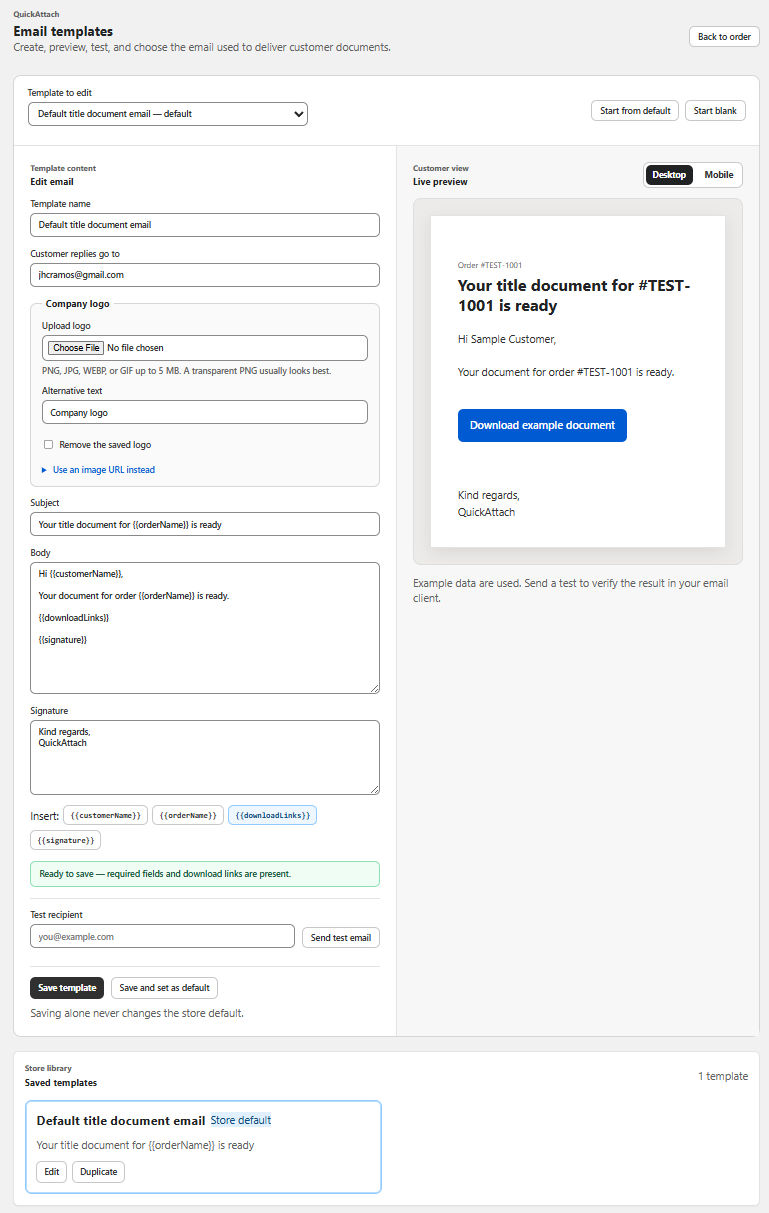
Set the logo, subject, message, reply-to, and signature, then preview the secure download button before delivery.
Download your personalized files securely from your order page.
Download filesThe order shows the file, fulfillment, delivery email, and customer download path, so support starts from Shopify instead of Sent Mail.
Follow one custom order from paid checkout to attached file, branded email, fulfillment, and customer re-download.
No per-order fees and no tiers to decode. Planned launch pricing includes a 7-day free trial before the US$19.80 monthly plan begins.
Practical guidance for Shopify merchants who sell personalized reports, certificates, proofs, and private documents.

Attach a customer-specific file to a Shopify order with recipient checks, a clear delivery record, and a distinction between Timeline and customer downloads.
Read guide →Map several custom files to Shopify order items with a delivery manifest that distinguishes item identity, quantity, readiness, and fulfillment.
Read guide →Evaluate QuickAttach with a focused trial plan covering order matching, partial delivery, customer access, and operational fit.
Read guide →Turn custom-file delivery into a Shopify workflow: attach the right document, send it from your brand, and keep the download available on the order page.
Available now on the Shopify App Store